

Whether you’re returning for your favourite slots or heading straight to the live tables, getting into your account should be quick, effortless, and secure. At Kong Casino, we’ve built our login system with UK players in mind — fast authentication, robust player protection, and a seamless experience whether you’re on desktop or mobile. This page walks you through everything you need to know about signing in, staying safe, and making the most of your account from the very first click.
We understand that friction at login is one of the most frustrating moments in online gaming. That’s why we’ve streamlined every step — from the moment you tap “Log In” to when the lobby loads in full. Our platform is fully licensed by the UK Gambling Commission (UKGC), meaning every security measure in place isn’t just best practice — it’s a regulatory commitment we take seriously.
This guide covers the full login process, what to do if something goes wrong, how our security protects you, and what awaits you once you’re inside. Read on to get the most out of your Kong Casino experience.
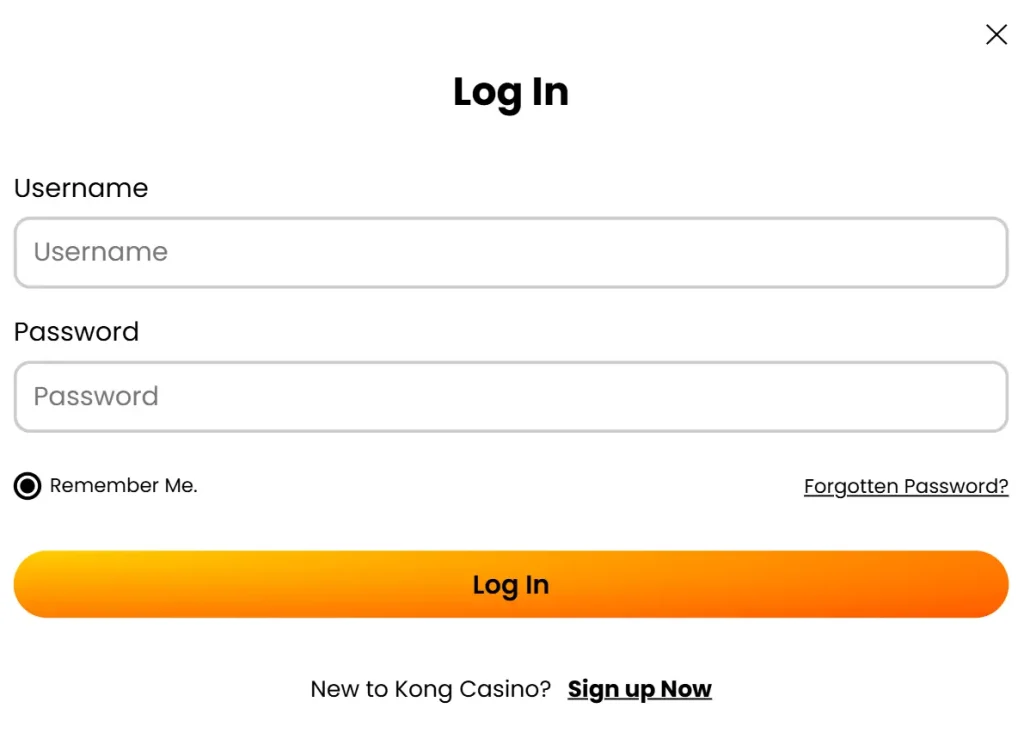
How to Sign In to Your Kong Casino Account Step by Step
Logging in takes under a minute when you know the steps. We’ve kept the process clean and straightforward, so there’s no unnecessary navigation or confusing menus standing between you and your games. Here’s exactly what to do:
- Visit the Kong Casino homepage by navigating to your browser and entering the site address, or clicking a bookmarked link.
- Locate the Log In button in the top-right corner of the page — it’s clearly visible on both desktop and mobile layouts.
- Enter the email address you registered with during sign-up. Make sure there are no typos, as the system is case-sensitive for email formatting.
- Type your password into the password field. If you’re on a private device, you may use the “Show Password” toggle to confirm what you’ve entered.
- Click or tap the Log In button to submit your credentials.
- If you have two-factor authentication (2FA) enabled, you’ll be prompted to enter your verification code from your authenticator app or SMS.
- Once authenticated, you’ll be redirected to your personalised lobby — welcome back!
If you’re using a trusted personal device, you can tick the “Remember Me” option to stay logged in between sessions. We recommend only doing this on devices that are password-protected and not shared with others. Security is our shared responsibility, and we make it easy for you to manage your preferences under your account settings.
Recovering Access When You Cannot Log In
Forgotten passwords and locked accounts are more common than most players realise — and we’ve made the recovery process as painless as possible. Whether you’ve misplaced your password, mistyped your email, or triggered a temporary lockout after multiple failed attempts, our support infrastructure is there to get you back in quickly.
If your password isn’t working, click the “Forgot Password” link displayed directly below the login form. You’ll receive a secure reset link to your registered email address within a few minutes. The link is valid for 30 minutes for security reasons, so check your inbox promptly — and your spam folder, just in case. Once you click through, you’ll be guided to set a new password that meets our strength requirements.
Common reasons players find themselves unable to log in include:
- Entering the wrong email address (particularly when you have multiple accounts on different platforms)
- Caps Lock being active, which affects password entry
- An outdated saved password being autofilled by a browser
- Account temporarily locked after five or more failed login attempts
- Account placed under a self-exclusion or cooling-off period
- Verification pending — new accounts sometimes require email confirmation before full access is granted
Should none of the above solutions resolve your issue, our customer support team is available via live chat and email. We typically resolve login-related queries within minutes during peak hours. Our agents are trained specifically for UK player support and are familiar with every edge case the login system might throw up.
Security Architecture Behind the Login System
We don’t take account security lightly. Every login at Kong Casino passes through a multi-layered security framework built to protect your personal data, your balance, and your peace of mind. Our infrastructure uses 128-bit SSL encryption on all data in transit, meaning your credentials are never exposed in plain text at any point between your device and our servers.
Beyond encryption, we employ real-time fraud detection that flags unusual login activity — such as access from a new geographic location or device — and prompts additional verification. This means even if someone somehow obtained your password, they’d still need to pass further authentication to gain access to your account.
Here’s a summary of the protections active every time you sign in:
- SSL/TLS Encryption — all session data is encrypted end-to-end
- Device Fingerprinting — new devices are flagged for additional verification
- Rate Limiting — repeated failed attempts trigger a temporary account lock
- Two-Factor Authentication (2FA) — optional but strongly recommended for all players
- Session Timeouts — inactive sessions are automatically terminated after a set period
- UKGC Compliance Monitoring — all logins are subject to responsible gambling checks
We actively encourage all players to enable 2FA via their account security settings. It takes less than two minutes to set up and dramatically reduces the risk of unauthorised access. Our security team reviews platform-wide login patterns daily and any anomalies are escalated immediately.
Comparing Login Methods Across Device Types
We’ve optimised the login experience across all the ways our players access Kong Casino. The table below breaks down what you can expect on each platform, including feature availability and ease of use.
| Platform | Login Method | 2FA Support | Remember Me | Biometric Login | Avg. Load Time |
|---|---|---|---|---|---|
| Desktop (Chrome/Firefox) | Email + Password | Yes | Yes | No | Under 2 seconds |
| Mobile Browser (iOS Safari) | Email + Password | Yes | Yes | Face ID (via browser) | Under 3 seconds |
| Mobile Browser (Android Chrome) | Email + Password | Yes | Yes | Fingerprint (via browser) | Under 3 seconds |
| Tablet | Email + Password | Yes | Yes | Partial | Under 2.5 seconds |
As you can see, our mobile login experience is fully featured and closely mirrors the desktop. We’ve invested in ensuring that players who game primarily on smartphones encounter no degraded functionality — the lobby, account settings, and security options are all fully accessible regardless of how you connect.
What UK Players Say About Online Casino Login Experiences
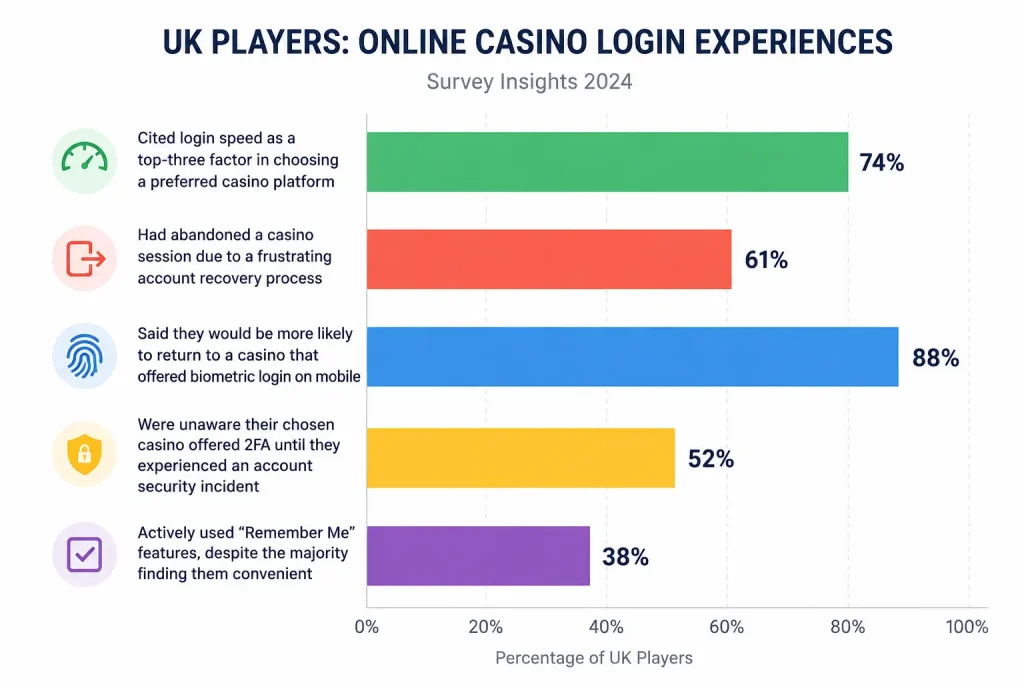
Understanding what players actually value at the login stage helps us continuously improve. Based on research conducted across UK online gambling forums and player surveys in 2024, the following trends were observed regarding player satisfaction with casino login systems:
- 74% of UK players cited login speed as a top-three factor in choosing a preferred casino platform
- 61% had abandoned a casino session due to a frustrating account recovery process
- 88% said they would be more likely to return to a casino that offered biometric login on mobile
- 52% of players were unaware their chosen casino offered 2FA until they experienced an account security incident
- Only 38% of players actively used “Remember Me” features, despite the majority finding them convenient
These findings directly inform how we’ve built and iterate our login system. We share this data not just for transparency, but because we believe informed players make better decisions about which platforms to trust. Our ongoing commitment is to sit at the top of that satisfaction curve for every metric that matters to you.
Advantages and Drawbacks of Our Current Login Setup
We believe in being honest with our players, which means acknowledging both where we excel and where we’re still working to improve. No system is perfect, and transparency builds more trust than exaggerated promises.
Here’s a balanced look at our current login experience:
What we do well:
- Extremely fast login times — typically under two seconds on stable connections
- Full UKGC compliance, giving players regulatory assurance
- Optional 2FA that’s simple to configure and highly effective
- Responsive design that works equally well on all screen sizes
- Clear password recovery flow with minimal steps
- Proactive fraud detection that catches suspicious logins before damage occurs
Areas where we’re actively improving:
- Native biometric login is not yet available on a dedicated app — it’s browser-dependent on mobile
- SMS-based 2FA, while functional, is less secure than authenticator apps — we encourage app-based 2FA
- Account lockout after failed attempts, while a security feature, can frustrate players who’ve simply misremembered their password
- Password reset emails, in rare cases, can experience delays during high-traffic periods
We’re committed to addressing each of these drawbacks through scheduled platform updates. Our development roadmap includes a dedicated mobile experience and expanded authentication options, which we’ll be announcing to our players directly via email and on-site notifications.
Responsible Gambling Features Connected to Your Login
One of the areas where we’re proudest of our platform is how responsible gambling tools are woven directly into the account system. The moment you log in, our systems run background checks that help maintain safe play. This isn’t just a regulatory checkbox — it’s something we’ve built with genuine care for our community.
When you access your account, our responsible gambling infrastructure automatically checks for:
- Any active deposit limits or session limits you’ve previously set
- Cooling-off periods that have been requested or applied
- National self-exclusion registrations via GamStop
- Unusual session length or spending patterns that may trigger a welfare check
If you’ve set a time-based session reminder, you’ll receive an in-browser alert at the interval you specified. We strongly encourage all players to make use of these features — they exist to protect you, and using them doesn’t limit your enjoyment, it simply gives you more control. You can review and adjust all responsible gambling settings at any time by visiting the dedicated section within your account dashboard.
Tips for Keeping Your Account Login Secure
Even with the protections we have in place on our end, there are sensible precautions every player should take on their own device and network. Account security is a partnership, and a few simple habits can dramatically reduce your exposure to risk.
We recommend the following to all registered players:
- Use a unique password — don’t reuse passwords from other websites. If another site you use suffers a data breach, reused credentials become a vulnerability.
- Enable 2FA — this single step blocks the vast majority of unauthorised access attempts, even if your password is compromised.
- Avoid public Wi-Fi — logging into your casino account on unsecured networks is risky. Use mobile data or a trusted VPN instead.
- Update your password regularly — changing your password every three to six months is a solid baseline habit.
- Log out on shared devices — never leave an active session open on a device others can access.
- Check your login history — your account dashboard shows recent login activity. If you see something unfamiliar, contact our support team immediately.
Our support team is reachable 24/7 for any security concerns. We will never ask you for your full password via email or live chat — if anyone claiming to be from Kong Casino asks for this, it is a phishing attempt and should be reported to us immediately.
Frequently Asked Questions About Kong Casino Login
What should I do if I receive a “credentials do not match” error even though I believe my details are correct?
This error typically means either your email or password has been entered incorrectly. Start by checking that Caps Lock is not active and that your browser’s autofill hasn’t inserted an old saved password. If you’re certain your credentials are right, use the “Forgot Password” link to reset your password. In some cases, a cached browser session can cause this — try clearing your cookies or using an incognito window. If the problem persists after a password reset, contact our live support team and we’ll investigate your account directly.
How long does a password reset link remain valid once I request one?
For security reasons, password reset links sent to your registered email address expire after 30 minutes. If you don’t receive the email within five minutes, check your spam or junk folder before requesting a new one. Email delivery times can vary slightly depending on your provider. Once you click the link and successfully set a new password, the old link is immediately invalidated — you cannot use it twice. If you miss the window, simply request a fresh link from the login page and the process starts again.
Can I access my account from multiple devices at the same time?
Yes, you can be logged in on multiple devices simultaneously — for example, a laptop and a smartphone. However, our fraud detection monitors concurrent sessions and may trigger a verification prompt if two sessions appear from very different geographic locations within a short timeframe. This is to protect your account. If you regularly switch between devices, we recommend enabling 2FA so that each new session can be verified quickly without needing to contact support. All active sessions can also be managed and terminated individually from your account security settings.
Is there a way to log in without a password, such as through a magic link or social login?
Currently, our platform uses traditional email and password authentication as the primary login method, with optional 2FA for additional security. We do not currently offer social logins via Google or Facebook, as these introduce third-party data-sharing considerations that we prefer to avoid for our players’ privacy. Magic link (passwordless) authentication is on our development roadmap and we anticipate introducing it in a future platform update. In the meantime, password managers like Bitwarden or 1Password are an excellent way to maintain strong, unique passwords without the effort of memorising them.
What happens to my account if I forget to log out and someone else uses my device?
Our sessions do have automatic timeout periods — after a set period of inactivity, the session will expire and the account will require re-authentication. However, if another person uses your device while the session is still active, they could access your account. This is why we strongly recommend always logging out on shared or non-private devices. If you suspect unauthorised access has occurred, change your password immediately, enable 2FA if not already active, and contact our support team so we can review your account activity logs and take appropriate action.
Why am I being asked to verify my identity every time I log in from my home computer?
If you’re being prompted for verification on a familiar device, the most likely cause is that your browser cookies have been cleared, you’re using a private/incognito window, or your IP address has changed significantly since your last verified session. Our system uses a combination of cookies and device fingerprinting to recognise trusted devices — without cookies, it cannot identify your machine. Make sure you’re not browsing in private mode if you want to benefit from remembered device status. Enabling 2FA via an authenticator app is also a much faster verification method than waiting for an SMS or email code each time.